


- The "Provides support" label and support hours help customers find the right account to contact for help.
- Welcome messages automatically greet users who start a Direct Message conversation, acting as a first icebreaker.
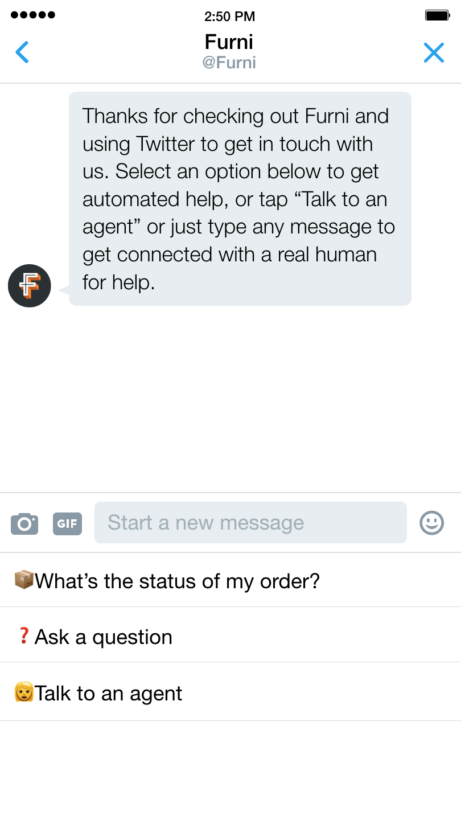
- Quick replies give customers multiple-choice options to guide them to the right next step, faster.
- These features balance automation with a human touch, reducing customer wait time without feeling impersonal.
The other day I wrote an easy guide on building a Facebook Messenger Bot and how B2B marketers like yourselves can use this intelligent tool to create better conversational experiences with prospects and customers while promoting your product or service.
As more bots are adopted to simulate real conversations, Twitter has been trying to bridge the gap between the automated experience (like Facebook chatbots are offering) and human interactions. The company has recently announced three new features that strengthen its position as a platform for connecting businesses and customers: Support account, Welcome messages, and Quick replies.
Essentially, these Twitter features create new opportunities for B2B companies to engage directly with customers via Twitter and show that they are a customer-centric organization.
Display that your account provides support
Can customers directly message you from your official Twitter account? Or perhaps you have a second Twitter profile dedicated to providing customer support?
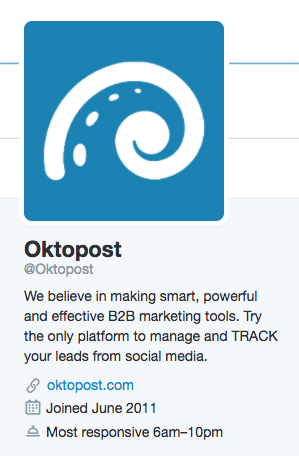
To help people find the right account where they are guaranteed to receive help, answers, and product-related support, Twitter enables you to add Provides supportinformation under the About section. You can also display the hours of availability so people know when to expect a response from you.
How to set it up
Here are the steps by Twitter to show that your account provides support:
- Sign in to dashboard.twitter.com.
- Click on your profile icon at the top of your screen and select Settings from the drop-down menu.
- Under Direct Messages, check the box next to Receive Direct Messages from anyone.
Note: You will need to enable this setting in order to display your account as a support account. - Under Support account, check the box next to Show that my account provides support to enable the Provides support message in search, and Tweet and Direct Message composers.
- Under Support hours, click the Add hours button to indicate on your profile when your account is most responsive to support requests from customers.
Welcome messages (in Direct Message)
Welcome messages greet people automatically as they initiate a conversation with you through the Direct Message option. In a way they serve as icebreakers by helping customers express their problem or ask a specific question straight away.
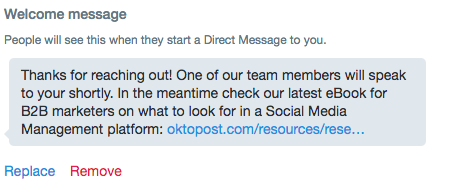
Your marketing team can decide on the type of message they wish to formulate. As a quick tip: besides the conventional “Hello how can we help you?” message, you can take it a step further by underlining your company values or even promoting a valuable resource, as Oktopost has done below:
How to set it up
Here are the steps Twitter provides on setting an automatic welcome message:
- From your profile icon, click Settings.
- Go to the Welcome messages section at the bottom of the Customer support
- Type your welcome message in the text box.
- Click Save.
Note: You will see a preview of your welcome message. You may replace or remove your welcome message at any time.
[Tweet “Roundup of New Twitter Features: What’s Essential for #B2B #Marketers”]
Quick replies (in Direct Message)
Quick replies serve as a list of multiple-choice options for guiding customers on the best way to interact with your company on Twitter and setting their expectations on what information you can provide before a company representative contacts them.
As you can see below Furni prompts customers with three ways to reply: getting them to say the status of their order, ask a specific question, or request to speak to an agent.
The director of Global Customer Service at Evernote emphasizes that this feature has enabled them to welcome your valued customers and automatically capture their issues, accelerating the resolution time and reducing customer effort.
Note: This feature is currently in private beta, and it appears that many companies are integrating with Twitter to develop it before rolling it out to everyone.
Why are these features important for your company?
Building a successful business requires you to focus not only on the quality of your product but also on your customers. A customer-centric organization creates services and experiences designed to support customers throughout their entire journey and touchpoints—be it when they discover your brand, reach out to you on social media, or become loyal customers.
Showing people that they can have a one-to-one conversation with you on Twitter and receive a warm, welcoming message immediately demonstrates your commitment to making customers happy. Twitter highlights that when you use the automatic welcome message with quick replies, you’re reducing customer waiting time while educating them on the best ways to interact with you. You’re also balancing between automation and human service to lead people to better expectations and outcomes.
In a time when customers seek faster and more convenient ways to connect with businesses, Twitter’s new features make it easier for you to place customers at the core of your business and enrich how you build relationships with them.
What do you think about Twitter’s effort in trying to connect between brands and customers? We’d love to hear your opinion in the comments below!