
Oktopost Claude Plugin

The first Claude Code Skill for B2B social

Turn the terminal into your Oktopost front-end. Draft posts, run campaigns, and track pipeline-attributed analytics without ever leaving your workflow.

The first Claude Code Skill for B2B social
Oktopost social media calendar view showing scheduled image posts across a weekly grid with a 'Draft a post' action button.
Publishing

From prompt to scheduled post

Use Claude to draft, schedule, and assign posts to campaigns instantly. Your existing Oktopost calendars and approval workflows handle the rest, so everything moves forward without manual work.

Visibility

Check your calendar without opening Oktopost

Ask Claude what’s scheduled for the week, what’s missing, and where campaigns need coverage. The plugin reads your Oktopost calendar in real time and recommends next steps based on your campaigns, channels, and publishing cadence.

Check your calendar without opening Oktopost Check your calendar without opening Oktopost
Chris Sheen

“At Celonis, we’re always looking for ways to push what B2B marketing can do,  particularly when it comes to scaling social programs that actually move the needle. The Oktopost Claude Plugin is a great example of that next step. It lets our team move faster from strategy to execution, without sacrificing the governance and measurement an enterprise environment demands. What stands out is having campaigns, advocacy, and analytics in a single workflow,  and being able to connect that back to real business outcomes.”

Chris Sheen
Chris Sheen
Senior Director of Social, Celonis
Oktopost Campaigns dashboard showing a list of active marketing campaigns with metrics for link clicks, conversions, and a 'Run campaigns' action badge.
Campaign execution

Run a full campaign without opening five tools

Brief Claude on your campaign to draft messages, queue posts across networks, and create employee-ready advocacy copy. Move from concept to approval-ready in minutes, in one prompt.

Oktopost 'My Approvals' dashboard with a 'Route approvals' overlay, showing pending LinkedIn posts and internal team collaboration notes.
Governance

Approvals stay exactly where your team already works

Everything the plugin drafts or posts follows your existing Oktopost approval workflow. Reviewers use the same queue, keeping brand governance intact and teams aligned without silos.

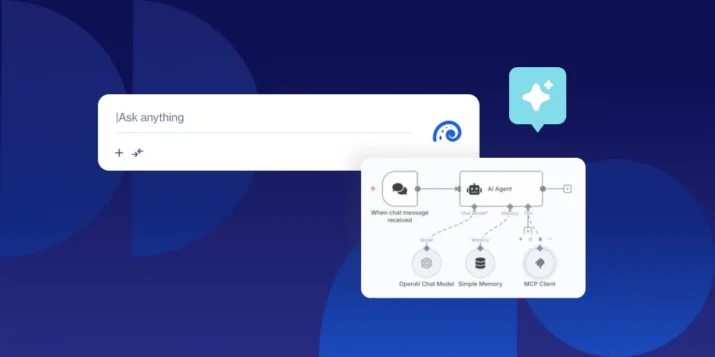
A technical diagram showing an AI Agent workflow using the Model Context Protocol (MCP) with connections to OpenAI Chat Models and an MCP Client.
Built on the Oktopost MCP

Secure, controlled, and fully auditable by default

The plugin runs on Oktopost’s MCP server using scoped API access and existing user permissions. All actions are logged in your standard audit trail, with support for service accounts, including key rotation and revocation controls.

More AI and automation across Oktopost

The Oktopost Claude Plugin is part of a broader set of AI and automation capabilities across the Oktopost platform.

AI Assist

Draft and refine post copy directly in Oktopost while keeping tone, messaging, and voice consistent and across every marketer and advocate.

Advocacy Agent

Give every employee an AI co-pilot that turns Board Stories into authentic, personal posts in seconds, driving higher adoption and more frequent sharing.

Social BI Dashboards

Self-updating dashboards are always current, automatically shared, and built to keep stakeholders aligned without manual work.

Oktopost MCP

Let AI agents trigger Oktopost actions through tools like n8n. Automate campaign workflows and publishing steps without losing control over governance.

Salesforce pipeline attribution

Tie every campaign and post executed through Claude directly to Salesforce pipeline and revenue attribution.

Agent Builder

Create custom AI workflows and design social media operations visually, no coding required.

Walk through the Claude Code Plugin and the full Oktopost platform

Bring your questions and walk away with a working setup plan for your team.

Frequently Asked Questions

Can I run my entire B2B social media workflow from Claude Code?

Yes. You can draft posts, schedule them, assign campaigns, and route approvals directly from Claude Code. Oktopost still handles execution, governance, and reporting in the background, so you’re not replacing your system, just changing where the work happens.

How long does it take to set up the Oktopost Claude plugin?

Most teams are up and running in under two minutes. Install from GitHub, run the setup command in Claude Code, and connect using your Oktopost API key.

What's the difference between Oktopost MCP and the Oktopost Claude Plugin?

The MCP server handles the data connection and provides raw tool access. The Oktopost Claude Plugin sits on top of the MCP server and provides the strategic context layer for how Claude drafts and voices your social content. Think of Oktopost MCP as the engine, and the Oktopost Claude Plugin as the driver.

How do I use Claude Code with Oktopost if API keys aren’t allowed locally?

You can run the plugin against an Oktopost service account scoped to a specific brand preset. Rotation, revocation, and audit logs all work through Oktopost's standard API key management.

What social networks are supported by the Oktopost Claude Plugin?

The same networks supported by Oktopost: LinkedIn, X (Twitter), Facebook, YouTube and Instagram, are supported by the Oktopost Claude Plugin.

What happens to approvals when posts are created in Claude?

Nothing changes. All posts created through the plugin are routed through your existing Oktopost approval workflows, so reviewers still approve content in the same place they always have.

Can I see my social media calendar inside Claude?

Yes. You can ask Claude what’s scheduled, identify gaps, and review campaign coverage in real time without opening Oktopost. You'll even be able to see what's in draft, and the Oktopost-Claude plugin will recommend next steps.