


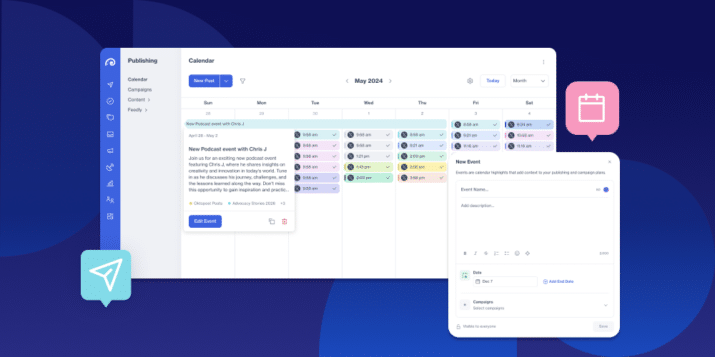
- Custom Calendar Events live natively in Oktopost's Publishing and Campaign Calendars, no separate tool required.
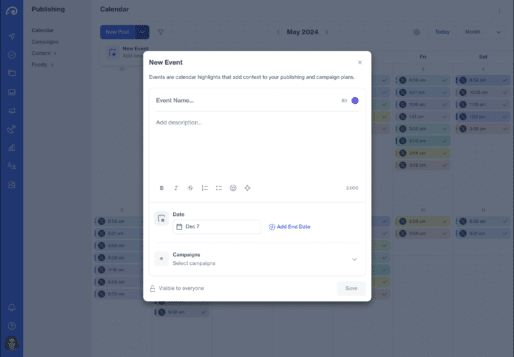
- Each event can include a name, color, description, date range, and campaign assignment.
- Events render across Day, 4 Days, Week, and Month views, including multi-day spans and busy weeks.
- Permission-aware visibility keeps campaign events scoped to relevant members, while general events stay open to the team.
- Getting started takes one click: open a calendar and select Add Event.
The Big Picture
Ask any social media team where their real plan lives, and you’ll usually get two answers: Oktopost, for what’s actually publishing, and a spreadsheet, a shared doc, or someone’s calendar invites, for everything else.
Product launches. Webinar dates. Registration deadlines. Industry moments. The dates that explain why content is scheduled the way it is rarely live next to the content itself.
That gap creates real friction. Publishing teams can see what’s scheduled, but not the business moments driving it. Campaign milestones get duplicated across tools just to keep the right people informed. And as those tools multiply, plans drift out of sync with what’s actually being published.
To help address this, we’re introducing Custom Calendar Events.
Custom Calendar Events are found directly inside Oktopost’s Publishing Calendar and Campaign Calendar. They bring your planning moments into the same environment where your team already schedules and publishes content, enabling a single view for planning and publishing.
What is Custom Calendar Events
Custom Calendar Events is a native planning layer inside Oktopost’s calendars. It lets teams create, edit, duplicate, and delete events, such as launches, campaign milestones, webinars, and key dates, directly in the Publishing or Campaign Calendar.
As it’s built directly into the calendars social teams already work in, teams no longer need to jump between a separate planning tool and Oktopost just to understand why a week looks the way it does.
How to add the context your calendar has been missing
Custom Calendar Events give every planning moment enough detail to actually guide the team, without adding overhead.
Here’s what you can capture on each event:
Name, color, and rich description
Give each event a clear name and color so it’s identifiable at a glance, and use the rich description field to capture messaging notes, agendas, or context the team needs.
Date range
Set a single day or a multi-day range, so launch windows, campaigns, and multi-day moments render accurately across the calendar.
Campaign assignment
Assign an event to a specific campaign so it shows up exactly where the team working that campaign is already looking.
This makes it easy to turn a launch window or webinar date into a planning moment the whole team can see and act on, without duplicating it into another tool.
See everything clearly, no matter how busy the calendar gets
Custom Calendar Events render across Day, 4 Days, Week, and Month views, including multi-day continuous events and overflow handling for weeks already packed with holidays, campaigns, and scheduled content.
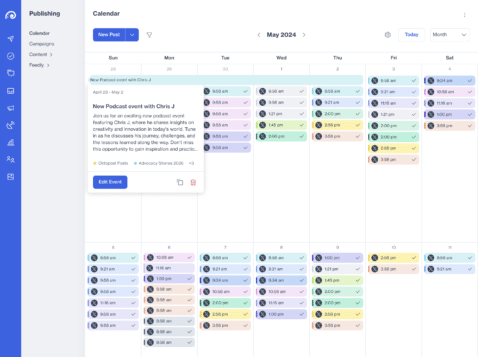
This means a marketing leader can open the monthly view and immediately understand not just what’s scheduled to publish, but why those publishing peaks exist, without the calendar becoming unreadable.
Keep governance intact with permission-aware visibility
Not every event should be visible to everyone, and Custom Calendar Events are built with that in mind.
- General events can stay visible to everyone on the team.
- Campaign-assigned events stay limited to the users who have access to that campaign.
- Permissions control who can view, create, update, duplicate, and delete events.
This lets teams share planning context broadly where it helps, while keeping campaign-specific detail scoped to the people who need it.
Planning and publishing together in one place
With social media managers, campaign owners, content teams, and marketing leaders in mind, the most common Custom Calendar Events scenarios include:
- Adding a multi-day product launch window to the Publishing Calendar, assigned to the relevant campaign, with key messaging captured in the description
- Tracking campaign milestones, such as a webinar date, registration deadline, launch day, and follow-up window, directly in the Campaign Calendar
- Mapping industry events, company moments, and seasonal dates onto the editorial calendar so writers and approvers can plan around them
- Reviewing the monthly calendar as a marketing leader to understand not only what’s scheduled, but why
Key capabilities include:
- Mixpanel tracking on event creation, opening, editing, and deletion
- Create, edit, duplicate, and delete events from the Publishing and Campaign Calendars
- Event fields for name, color, rich description, date range, and campaign assignment
- Rendering across Day, 4 Days, Week, and Month views, including multi-day events and overflow handling
- Permission-aware visibility and actions, with campaign-scoped events for campaign members
Get started in minutes
Comparable publishing and editorial calendar tools already support event-style planning, and for good reason: teams managing campaigns, launches, and content operations expect their calendar to hold the full plan, not just the posts.
With Custom Calendar Events, that full plan now lives inside Oktopost, right alongside the content your team is already scheduling and publishing.
To try it out, log in to Oktopost, open your Publishing Calendar or Campaign Calendar, and click Add Event to bring your first key date into the plan. Need help with Custom Calendar Events? Reach out to your Account Manager.