
How to upload Your Oktopost certification to LinkedIn

Product Updates Published: March 05, 2023
How to upload Your Oktopost certification to LinkedIn

Congratulations! You recently attended an in-person or 1:few Oktopost Certification workshop and earned an Oktopost Certification. Since LinkedIn is the first impression you give to potential and current employers, prospects, and customers it’s important to make sure it’s up-to-date with your most recent achievements. It’s a great way to put your best foot forward on social.

So below, we explain the best way to add your Oktopost certification to your LinkedIn profile, as well as some easy-to-follow steps, and expert tips for showcasing your expertise.

Upload your certification to LinkedIn

Step 1

Copy and paste the Personal Link of the certificate that you received via email and add it under “Licenses and Certifications” on LinkedIn.

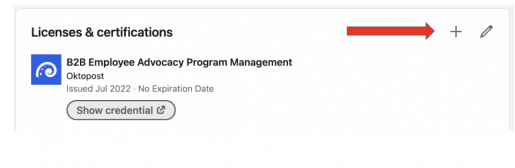
To access your “Licenses and Certifications” on LinkedIn, navigate to the “Licenses and Certifications” section of your LinkedIn profile and click the + sign to add a new certification:
 

Step 2

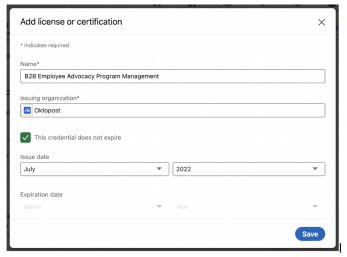
Once you navigate to the “Licenses and Certifications” section, enter the below details:

Name: The Name of Your Certificate [Example: B2B Employee Advocacy Program Management]
Issuing Organization: Oktopost
Issue Date: The date you received the certification [Example: July 2022]
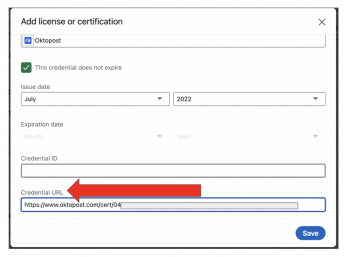
Credential URL: [Your Unique Link that you received via email]
Step 3

Hit save. Your certificate will now be showcased on your LinkedIn profile.

Best practices

LinkedIn is a two-way street, which means it’s as much about you as it is about your network visiting your profile.

Once you add your certification to LinkedIn, go ahead and create a meaningful post about the experience. Recall something you learned, share a photo, or consider what you may do differently in the future after gaining new knowledge.

When you use this opportunity to create a post, your exciting news and hard work in upskilling will go further on LinkedIn.

For your network, your certification will be music to their ears as they will be eager to engage with your post. And depending on the engagement, this could be a great post to feature at the top of your profile!

When posting on LinkedIn, don’t forget to:

  • Tag @Oktopost
  • Tag any of the influential people you met that day
  • Add hashtags: #b2bsocialmedia #marketing #socialmedia #socialmediamarketing #oktopost #certification

And as always, if you need assistance with any of the above, from adding your certificate, or crafting a post, we’d be happy to help! Please feel free to connect directly with your dedicated customer success manager.
Frequently Asked Questions

How does Oktopost Certification enhance B2B professional credibility on LinkedIn?

Oktopost Certification on LinkedIn serves as a critical first impression for potential employers, prospects, and customers. It prominently showcases your expertise in B2B social media strategies and platform proficiency, immediately establishing trust and demonstrating your commitment to professional development in a competitive B2B landscape.

What are the precise steps to add my Oktopost Certification to my LinkedIn profile?

To add your Oktopost Certification, navigate to the 'Licenses and Certifications' section of your LinkedIn profile and click the '+' sign. Enter the certificate's Name (e.g., B2B Employee Advocacy Program Management), 'Oktopost' as the Issuing Organization, the Issue Date, and your unique Credential URL, then hit save.

What are the best practices for maximizing B2B engagement with my Oktopost Certification announcement on LinkedIn?

To maximize B2B engagement, create a meaningful LinkedIn post sharing your learning experience, a photo, or future applications of your new knowledge. Crucially, tag @Oktopost, include any influential people you met, and use relevant hashtags such as #b2bsocialmedia, #marketing, #socialmedia, #socialmediamarketing, #oktopost, and #certification.

What B2B marketing and social media skills does an Oktopost Certification validate?

An Oktopost Certification validates specialized skills in B2B social media management, strategy implementation, and leveraging an enterprise social media platform for business outcomes. It signifies expertise in areas like B2B Employee Advocacy Program Management, demonstrating proficiency crucial for modern B2B marketing roles.

Why is showcasing my Oktopost Certification on LinkedIn important for B2B career advancement?

Showcasing your Oktopost Certification on LinkedIn is vital for B2B career advancement as it highlights your commitment to upskilling and staying current with industry-leading social media practices. It signals to potential employers and network connections that you possess validated expertise crucial for driving B2B marketing success and professional growth.

Get ready!

The latest B2B marketing magic is about to land in your inbox
Join 30K+ pros already on the inside

Engaging social media content and interaction, illustrating B2B social media marketing tips and insights.