

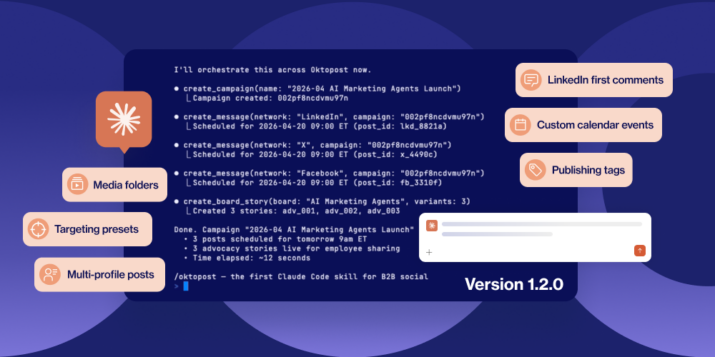
- The Oktopost Claude Plugin launched in May 2026, connecting Claude Code to Oktopost for messages, campaigns, approvals and scheduling.
- Custom calendar events can now be created, read, updated and deleted, and linked to campaigns, so launches and deadlines sit on the content calendar next to scheduled posts.
- Media folders can be created, fetched, listed, renamed and deleted, so the asset library keeps its structure when an agent is filing into it.
- Publishing tags can be read and applied to messages and campaigns, so agent-created content appears in reporting that groups by tag.
- LinkedIn targeting presets can be listed per social profile and applied when a post is scheduled. The user picks the preset; Claude does not choose targeting.
We launched the Oktopost Claude Plugin in May. It connected Claude Code to Oktopost so you could create messages, assign them to campaigns, route them for approval and schedule them to social profiles without opening the app.
Version 1.2.0 extends to four more parts of Oktopost now:
1. Custom calendar events
Claude can now create, read, update and delete custom calendar events. These are the things on a content calendar that aren’t posts: a launch date, a conference, a milestone, a deadline.
An event can be linked to one or more campaigns, so a launch date sits with the campaigns it belongs to instead of floating on its own.
That’s what makes a gap in the calendar readable. When the calendar holds only scheduled posts, an empty week is just an empty week. With the events on it, the reason is on the calendar too.
2. Media folders
Claude can create, fetch, list, rename and delete media folders, so the asset library keeps its structure when an agent is the one filing into it.
3. Publishing tags
Claude can read your publishing tags and apply them to messages and campaigns. Content it creates carries the same tags as everything else, so it appears in reporting that groups by tag.
4. LinkedIn targeting presets
Claude can list the LinkedIn audience targeting presets on a social profile and apply one when it schedules a post. You pick the preset. Claude doesn’t choose targeting on its own and it can’t build a new audience. The presets stay in Oktopost, defined by whoever owns audience strategy.
Multi-profile posts and LinkedIn first comments
Neither are new in 1.2.0, but they get missed often enough that I’m using this post as an excuse to point them out.
A single post can go to several social profiles in one call, so publishing one announcement across a company page and a set of regional pages is a single request rather than a sequence of near-identical ones.
LinkedIn posts can carry a first comment, with text, an image, or both. In a multi-profile post the comment goes on every LinkedIn profile in the call, and any non-LinkedIn profiles are published without one.
In summary: What you need to run it
The plugin is open source under Apache 2.0 and lives at github.com/Oktopost/oktopost-claude. It talks to the Oktopost API with your own API key, so it reaches exactly what your Oktopost permissions already allow and nothing else.
Three prerequisites:
- An Oktopost account
- An Oktopost API key, generated at app.oktopost.com/my-profile/api
- Node 20 or later
Then install it from inside Claude Code:
/plugin marketplace add Oktopost/oktopost-claude
/plugin install
If you want the background on why we built this, I wrote about the execution gap it closes at launch, and there’s more on the Oktopost MCP Server underneath it.
Enjoy!