
- Integrates advocate roster and adoption data into Social BI.
- Displays the entire roster as it stands today without date filtering.
- Tracks onboarding, recency, networks, topics, and attributes.
- Allows roster segmentation and individual advocate drill-down.
- Available in Social BI alongside Posts and Engagements.
Checking the pulse of your advocacy program
Every advocacy program has a pulse. On a good week, you can feel it: new names on the leaderboard, posts going out, a sales rep mentioning that a prospect saw something a colleague shared.
But a fading pulse is quiet. The advocate who accepted the invite and never logged in doesn’t tell you. Neither does the one who shared twice a few months ago and hasn’t been back since. You only notice when the numbers dip, or when leadership asks how many people are actually taking part. Then you’re piecing the answer together from exports.
And participation is what makes a program pay off. Independent research from the Hinge Research Institute found that firms with formal advocacy programs often credit them with bringing in new business. That only happens when advocates keep showing up, and as anyone who has run a program knows, the buzz from launch day fades fast.
The Advocacy Data Source is built for that moment, when you need to know who’s still with you and who needs a gentle nudge.
What’s new
The Advocacy Data Source is a new data source in Social BI for teams running Oktopost Employee Advocacy. It pulls your advocate roster and adoption data into the reporting tool you already use for everything else.
So alongside “how did our posts do?”, you can now ask “how are our people doing?” Who joined? Who finished the setup? Who’s sharing, and who went quiet? You can slice the answers by activity, department and other user attributes, connected networks, topics, boards, and AI Agent settings. It joins the other Social BI data sources and works alongside Posts and Engagements, which still cover content performance.
Think of it as a regular health check for your program, rather than a post-mortem once a quarter.
How it works
See your whole program as it stands today
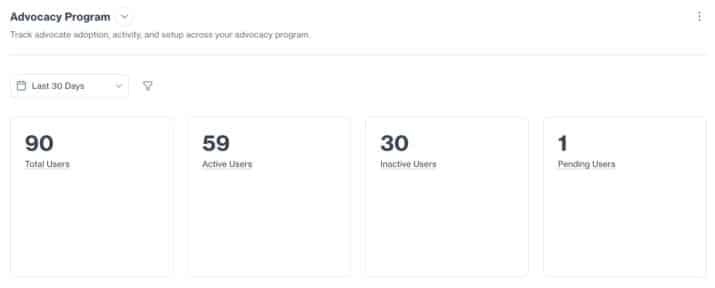
Pick the Advocacy Data Source when you build a Social BI report, and you’ll see every Active and Pending advocate in one view. It shows your roster as it stands today, so the date range you pick doesn’t hide anyone. That matters more than it sounds. An advocate who hasn’t shared all quarter would slip out of most activity reports, and they’re exactly the person you’re looking for.
Spot the warning signs
Filter by the signals that tell you something’s off: onboarding status, when someone was last seen, when they last shared, which networks they’ve connected, and which topics they follow. You can also filter by user attributes and board assignments.
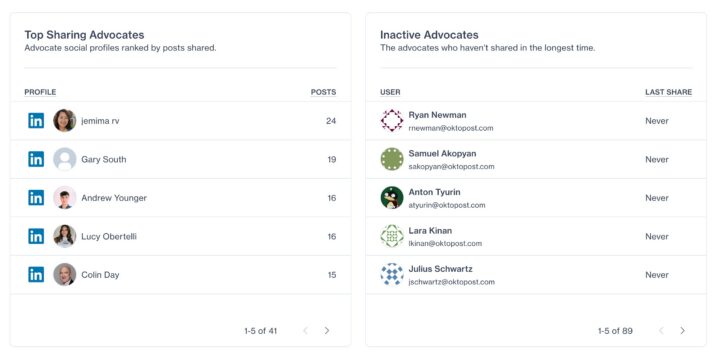
Say you want everyone who has never logged in, or hasn’t shared in the last two months. Filter for them, open the segment, and decide who gets a friendly reminder and who needs a proper conversation.
Segment the roster and drill down
Group your roster the way your program is organized: by department, board, network connection, or topic. Then count users and topic subscriptions in each group to see where adoption is strong and where it’s thin.
When one group looks low, click into it. You’ll see the actual advocates behind the number. So instead of “sales seems a bit quiet,” you have a list of names you can follow up with today.
Track AI Agent adoption
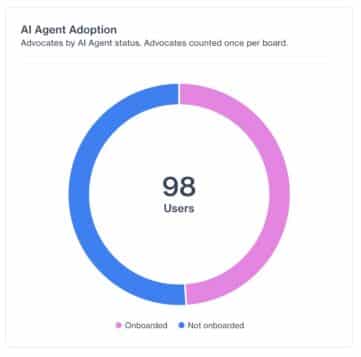
See who has onboarded the Advocacy AI Agent, and whether each person has it set to Review or Automated mode. If you’ve rolled out the AI Agent, this tells you how far it has actually spread. It also shows which teams haven’t picked it up yet and could use a quick walkthrough.
Why this matters for advocacy program managers
Find quiet advocates before they drift away
Advocates rarely quit out loud. They get busy, miss a few weeks, and drift. By the time it shows up in your engagement numbers, they’ve been gone for a while.
With the Advocacy Data Source, you can spot them early, while a quick message still works. Pair it with tactics that keep advocacy engagement high, such as competitions and Slack or Teams reminders, and you have a plan for each group.
Connect the adoption dots
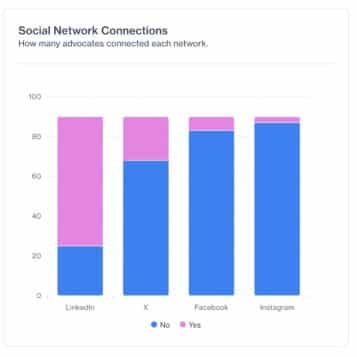
Onboarding, network connections, topic subscriptions, and AI Agent settings each tell you part of the story. Seen together, advocate by advocate, they show you where the program is actually stuck. That’s when you can ask the questions that lead somewhere. Which boards have advocates who signed up but never connected a social profile? Which department follows the fewest topics? Each answer points to a real fix, whether that’s a setup reminder, a short training session, or fresher content for one team.
Report on program health without the spreadsheets
Most program leads know the drill. Leadership asks for an update, and you lose an afternoon stitching exports together. Now you can build a program-health dashboard once and open it whenever someone asks.
Because adoption data sits next to your performance reporting, you can tell the whole story, from how many advocates are active to the results they drive. It also gives you a clear baseline to compare against wider employee advocacy statistics.
Ready to try it?
Your program’s pulse is now one report away. No exports, no guesswork. The Advocacy Data Source is available now in Social BI for all accounts with Advocacy enabled.
Already using Oktopost? Open Social BI and choose the Advocacy Data Source when you create a new report. If you’d like help setting up your first program-health dashboard, your Customer Success Manager can walk you through it.
New to Oktopost? Book a demo to see how the Advocacy Data Source helps you keep your advocacy program healthy, alongside Oktopost Employee Advocacy.